Skip to content

APPRAISAL MANAGEMENT SOFTWARE FOR AMCS

Appraisal management software.
For AMC teams.

More clients. Less chasing. Valari helps appraisal management companies organize orders, appraiser panels, task owners and review follow-ups in one connected workflow.

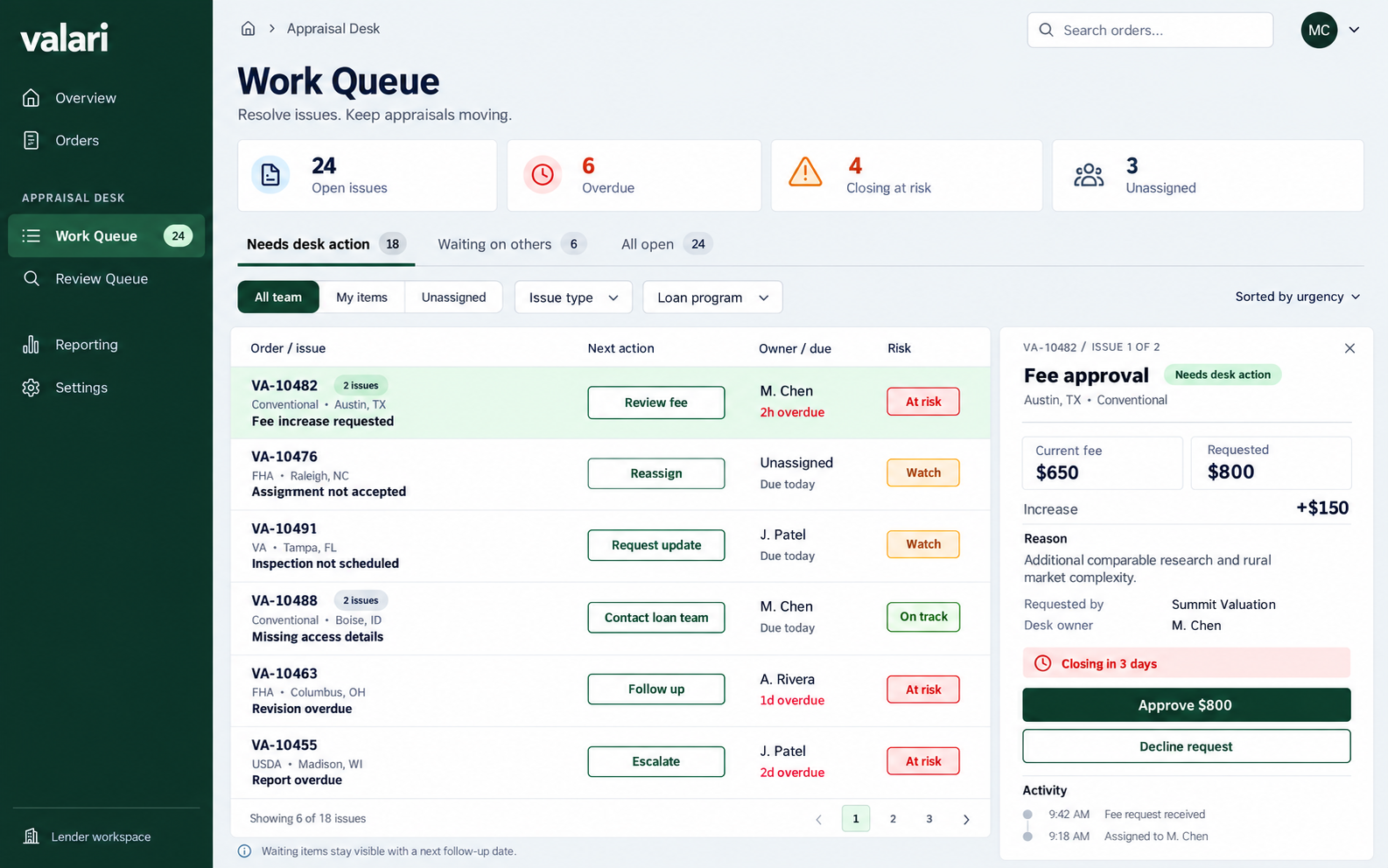
Appraisal management work queue showing order issues, owners, next actions and fee requests
Appraisal desk work queue
Appraisal management work queue showing order issues, owners, next actions and fee requests

Appraisal desk work queue

ONE OPERATION. CONNECTED RESPONSIBILITIES.

A clearer path
through every order.

Choose a stage to explore the handoff.

Explore the AMC workflow
THE HANDOFF / 01

Start with the assignment essentials.

Keep client, product and property details connected as the order takes shape.

  1. 01Client and service
  2. 02Property details
  3. 03Persistent order summary
Native Valari order entry with client and service expanded
Order entry
Native Valari order entry with client and service expanded

Order entry

THE HANDOFF / 02

Review the panel before assigning.

Compare appraiser coverage and qualifications in one clear view.

  1. 01Appraiser profiles
  2. 02Recorded coverage
  3. 03Order-specific eligibility
Appraiser panel with profiles and county coverage
Appraiser selection
Appraiser panel with profiles and county coverage

Appraiser selection

THE HANDOFF / 03

Give the next step a clear owner.

Keep independent issues, next actions and follow-ups in view.

  1. 01Desk action
  2. 02Responsible owner
  3. 03Separate deadlines
Appraisal desk work queue with order issues and next actions
Work queue
Appraisal desk work queue with order issues and next actions

Work queue

THE HANDOFF / 04

Keep findings tied to the report.

Keep appraisal review moving with clear findings, revision requests and next steps.

  1. 01Report version
  2. 02Review findings
  3. 03Recorded decisions
Report-review workspace with findings and revision actions
Report review
Report-review workspace with findings and revision actions

Report review

THE HANDOFF / 05

Follow through without guessing.

Keep delivery records and acknowledgments close at hand for easier follow-up.

  1. 01Delivery evidence
  2. 02Recorded receipt
  3. 03Acknowledgment history

LESS CHASING. CLEARER NEXT STEPS.

Know what needs attention.
Keep every order moving.

One client needs an update. Another order needs an inspection. Your desk needs a clear next step—not another spreadsheet to reconcile. Explore the appraisal desk workflow.

  • Bring separate issues into one view without losing the client or order.
  • Focus by client, AMC office, recorded Client Advocate, or task owner.
  • Open the right workflow for assignment, scheduling, and accountable follow-up.
Explore the AMC work queue →
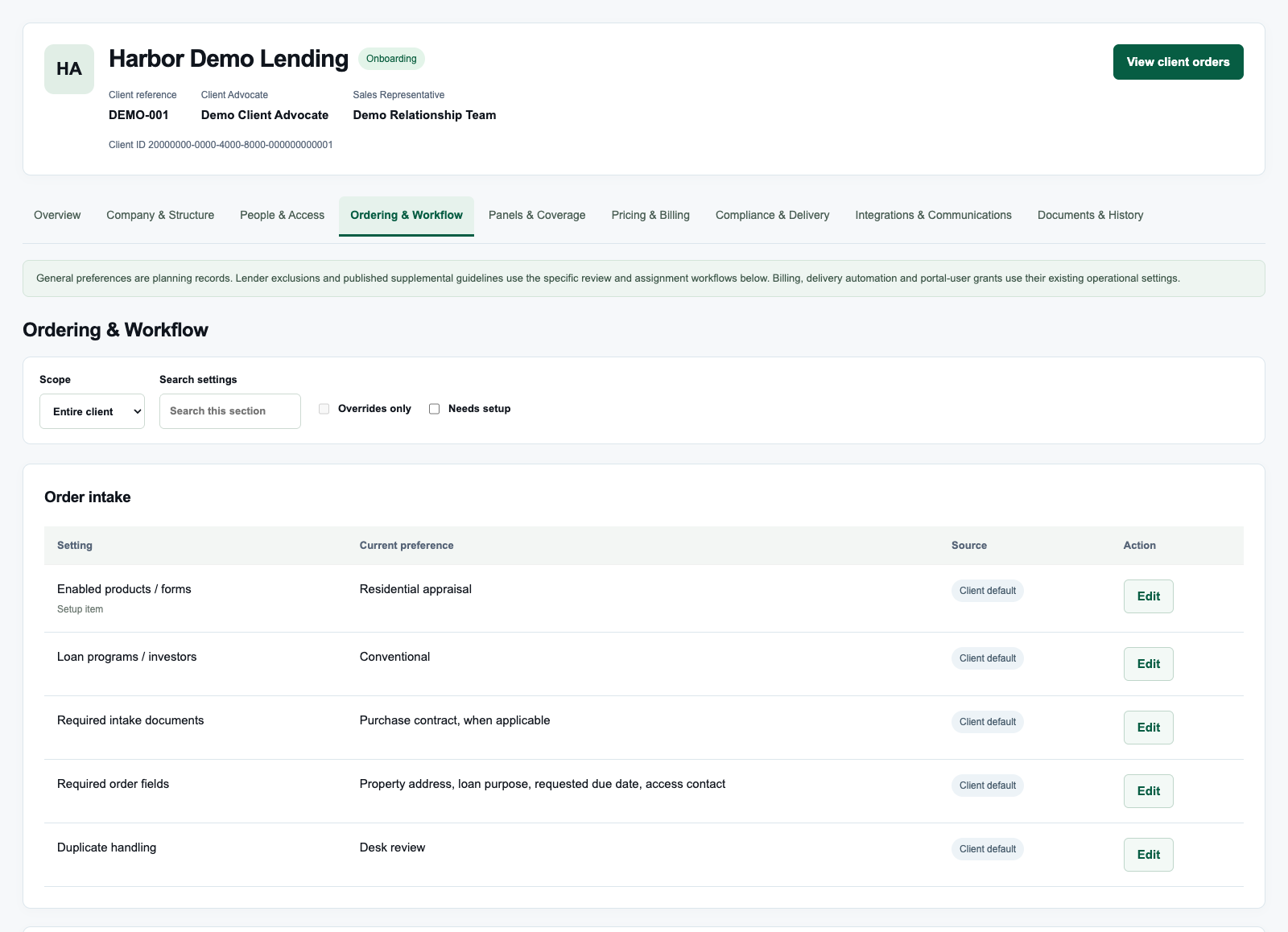
AMC Enterprise client profile showing Ordering and Workflow, required intake documents, order fields and client defaults with demo data
AMC client requirements
AMC Enterprise client profile showing Ordering and Workflow, required intake documents, order fields and client defaults with demo data

AMC client requirements

CLIENT CONTEXT & READINESS

Know the client.
Connect the requirements.

An order belongs to a client relationship. Explore the identity, contacts, contract, and operating preferences behind that relationship as your team plans its work.

  • Keep client instructions and recorded responsibilities close to the order.
  • Define responsibilities before the first handoff.
  • Review contract and launch requirements with your team.
Discuss your client onboarding needs →

ACCOUNTABILITY IN THE DETAILS

Clear ownership.
A record of what changed.

01 / RESPONSIBILITY

Give the next action an owner.

Record the task owner, backup, priority, and blocker so the team knows who is carrying the work forward.

02 / HISTORY

Keep the reason with the change.

Review versioned task changes, recorded actors, and completion evidence in the context of the order.

03 / NEXT STEPS

Keep each commitment distinct.

See task deadlines, client commitments and delivery follow-ups together so your team can plan the next handoff.

A CLOSER LOOK AT YOUR WORKSPACE

Appraisal order management. Clearer next steps.

See what needs attention, who owns the next step and the story behind each handoff.

01 / ORDER VISIBILITY

A focused view of your pipeline.

Bring active orders, stages, clients, and the next recorded action into one operating view. Find the work that needs attention without losing the assignment’s context.

  • Client, stage, and responsibility filters
  • Overdue, blocked, and unowned queues
  • Search by property, file, or client

02 / CLIENT ONBOARDING

Set up each lender client once.

Connect client identity, operating contacts, designated advocates, contract review, and preferences in an onboarding workspace. Confirm readiness before activation.

  • Client relationship and contact records
  • Contract terms, versions, and review
  • Client-specific preferences and readiness

03 / ASSIGNMENT COORDINATION

Appraiser panel management, with context.

Review shared appraiser profiles and organize named panels. Keep assignment follow-ups with their owners, and check client requirements and eligibility for each order.

  • Assignment-stage task views
  • Responsible owner and backup
  • Client requirements and panel context

04 / REVIEW & EXCEPTIONS

Appraisal review follow-ups, clearly assigned.

Focus review-stage work, describe what is blocking progress, and connect the next action to a prerequisite. Keep the evidence behind resolution with the order.

  • Review and blocked-work queues
  • Documented blocker and prerequisite
  • Completion evidence and change reasons

05 / OPERATIONAL TIMING

Make the follow-up clock clear.

Set task deadlines in your operating time zone and retain the original deadline. Make approaching and overdue follow-ups visible alongside the order’s separate due date.

  • Due-today and overdue views
  • Time-zone-aware task deadlines
  • Task, order and delivery milestones

06 / HISTORY & ACCOUNTABILITY

Keep the reason behind the change.

See who changed what, why it changed and what comes next. Keep ownership updates and completion evidence close so your appraisal desk can resolve questions without retracing the order.

  • Versioned task changes
  • Who changed what, and when
  • Completion and cancellation reasons

A CONNECTED WAY TO WORK

From the first detail
to the next step.

01

Focus the production queue

Filter active work by client, stage, or responsibility. Find the orders with overdue, blocked, or unowned follow-ups.

02

Assign the next action

Record a task, owner, backup, priority, and deadline. Add context about the blocker or prerequisite so the team knows what needs to happen.

03

Keep the evidence of progress

Keep follow-up history and completion evidence with the order so your team can see progress and pick up the next step.

YOUR OPERATION DOESN’T STOP AT ONE SYSTEM

Bring your stack.
Plan the connections.

Bring your order sources, review process and accounting needs. We’ll map the handoffs your team wants to improve.

↘

Order sources

Identify your lender portals, LOS, incoming order channels, and required intake data.

◎

Appraiser relationships

Map the updates your desk, lender contacts and appraisers need to keep each handoff clear.

↗

Review, delivery & finance

Plan clearer handoffs across review, delivery and billing, with lender receivables, appraiser payables and supplemental charges in view.

Map your requirements with us →

FIND YOUR FIT

See Valari through the lens of your business.

Bring an appraisal order and the assignment or review steps you’d like to simplify. Let’s walk through how your team can keep the next step clear.

  • ✓ Teams coordinating follow-ups across lender clients
  • ✓ Managers who need clear ownership and exception queues
  • ✓ AMC teams exploring their next step

WHAT HAPPENS NEXT

  1. Tell us about your business

    Select your role and share the part of your workflow you want to improve.

  2. Confirm the right fit

    We’ll explore your workflow, answer questions and discuss pricing.

  3. Plan your first steps

    Talk through setup and the next steps for your team.

Request an AMC walkthrough →

MAKE AN INFORMED NEXT MOVE

Your questions.
Clear answers.

Understand the scope before you make a change to your business.

Can we see a walkthrough before committing?

Yes. Request an AMC walkthrough and describe your order volume, team responsibilities, and the handoffs you want to improve. We’ll review your needs and follow up to plan your walkthrough.

What stays with a completed follow-up?

Keep the task owner, recorded changes and completion evidence together. Your team can see what happened and pick up the next step with context.

Can we filter work by client or by responsibility?

The production desk includes client filtering, property/file/client search, and views for personal, unowned, overdue, blocked, and stage-specific work.

How do we keep handoffs accountable?

Give each follow-up an owner, backup and deadline. Keep the reason for changes and the evidence behind completed tasks with the order.

What will we cover in a walkthrough?

We’ll discuss order sources, lender clients, panel and assignment requirements, production follow-ups, review, delivery, and your existing systems. We’ll talk through pricing, setup and next steps.

BUILT AROUND YOUR EXPERTISE.

Bring your work
into focus.

Let’s see how Valari fits the way your business works.

Request an AMC walkthrough →

Are you still there?

You haven’t used Valari for 15 minutes. You’ll be signed out in 60 seconds unless you extend your session. Unsaved changes may be lost.